Screen Mirroring Setup for PC in Windows 10
Here's how to set up screen mirroring on a Windows 10 device.
Go to Settings on your PC.
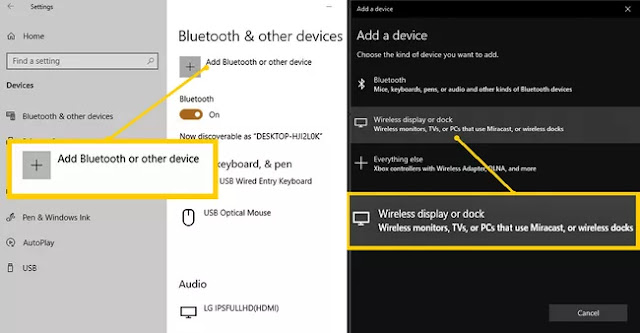
In "Bluetooth & other devices", select "Add Bluetooth or other device". This will take you to the "Add a Device page":

Confirm connection in the TV.
When your connection is confirmed, your PC screen will be displayed on the Samsung TV.
Source: https://www.lifewire.com/how-to-download-a-different-samsung-tv-internet-browser-4684267
If you want to add a shortcut in your desktop for this new connection without going through all these steps every time, just right-click in your desktop, and select
%windir%\system32\displayswitch.exe
Go to Settings on your PC.
In "Bluetooth & other devices", select "Add Bluetooth or other device". This will take you to the "Add a Device page":
The PC will scan for available devices. Obviously, your TV must be on during this step.
Once your Samsung TV shows up on the device list, select it and wait for your PC to connect to your Samsung TV.
Once your Samsung TV shows up on the device list, select it and wait for your PC to connect to your Samsung TV.
Confirm connection in the TV.
When your connection is confirmed, your PC screen will be displayed on the Samsung TV.
Source: https://www.lifewire.com/how-to-download-a-different-samsung-tv-internet-browser-4684267
If you want to add a shortcut in your desktop for this new connection without going through all these steps every time, just right-click in your desktop, and select
New -> Shortcut,
and in the location of the item paste:
%windir%\system32\displayswitch.exe
You can give the connection the name that you prefer or simply keep DisplaySwitch.exe.
When you click the new shortcut, the following will appear:

Click on "Connect to a wireless display" and you got it.
Source: https://community.spiceworks.com/topic/1540963-how-to-create-desktop-shortcut-to-connect-to-wireless-display
When you click the new shortcut, the following will appear:
Click on "Connect to a wireless display" and you got it.
Source: https://community.spiceworks.com/topic/1540963-how-to-create-desktop-shortcut-to-connect-to-wireless-display
Comments
Post a Comment